
Chase Mobile
JPMorgan ChaseFinance
4.8647.68K Reviews
- Version
- 4.802
- Installs
- 50.00M
- Age Rating
- Everyone
Screenshots
Our Review of Chase Mobile
 Analysis by Appyee
When a bank app becomes part of my routine, I judge it less by how many buttons it has and more by whether it helps me make a small money task feel manageable. Chase Mobile is built for customers who want to check in on their banking from a phone rather than plan a trip around it. I find that focus useful: quick account checks and everyday transactions are the point, not a full financial-planning course.
It is a free finance app from JPMorgan Chase, and its long history gives existing customers a familiar way to handle routine banking. The current version is 4.712, while the app’s first release dates to Nov 19, 2010. Those facts show that this is an established product with an actively numbered version, but they do not tell me exactly which screens or tools changed over time. I would treat the current app as the practical reference and judge it by how well it fits my needs today, rather than assume every older workflow remains unchanged.
What its current role does well
For a Chase customer, the main advantage is having an account view and common banking actions gathered in one place. I can see why that matters in ordinary moments: checking whether a payment has cleared before making another purchase, or looking at recent activity while sorting out a shared expense. The app is most compelling when it shortens those small gaps between a question and an answer.
Its scale is notable without being a guarantee of a perfect experience for every person. It has a 4.7 average from around 2 million ratings and over 50 million installs. The age rating is Everyone. I read those figures as signs of broad adoption, not proof that every feature will suit every customer or that a banking app can replace careful review of transactions.
A familiar tool, not a reason to switch banks
If you already bank with Chase, using its app is a natural extension of that relationship. If you primarily use another bank, I would not install it expecting a universal dashboard that brings every institution together; its value depends on having Chase accounts to manage. A budgeting app may be a better fit if your main goal is a detailed view across multiple banks, while a bank’s own app usually makes more sense for checking and acting on that bank’s accounts.
I also would not treat a convenient mobile view as a substitute for checking the details of an important transfer or payment. Before confirming a transaction, I take a moment to review the destination and amount. That small pause is worthwhile in any banking app, especially when I am doing something quickly between errands.
Small habits that make mobile banking more useful
I get more value from a banking app when I use it for focused checks instead of repeatedly opening it without a purpose. A practical routine is to review recent activity after a busy day, then follow up on anything unfamiliar while the context is still fresh. For a regular bill, I would check that the scheduled payment details are correct before relying on a recurring setup; automation reduces repetition, but it does not remove the need to verify the arrangement.
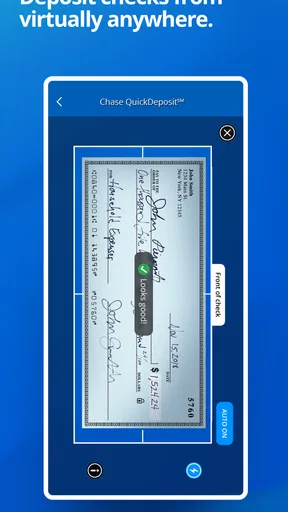
Mobile deposits can also save a trip when a paper check is involved, but they are not quite the same as receiving spendable funds instantly. I would follow the app’s capture instructions carefully, make sure the check image is readable, and keep the paper check until the deposit is confirmed and I know it is safe to dispose of it. That is a more careful workflow than simply snapping a picture and moving on, but it helps avoid preventable confusion.
Who may prefer another approach
This app makes the most sense for people who already use Chase and value banking tasks on a phone. It is less compelling if you prefer doing financial work on a larger screen, want one tool devoted to long-term budgeting across several institutions, or rarely need to check accounts away from home. In those cases, a web banking session, a separate budgeting service, or simply your primary bank’s app may fit better.
I also keep expectations measured around support. Being able to seek help through an app can be convenient, but a mobile channel is not automatically the quickest route for every problem. For an urgent or sensitive issue, I would use the contact options available in my account and choose the route that suits the situation, rather than assume a chat or in-app message will resolve it immediately.
Hey there! So, I recently got my hands on the Chase Mobile app, and let me tell you, it’s quite the handy tool if you’re someone who likes to keep their finances organized on the go. Whether you’re sipping coffee at your favorite café or lounging on the couch, this app makes managing your bank accounts a breeze. Let’s dive into what this app offers and why it’s becoming a staple for so many.
Features That Stand Out
First things first, the app is packed with features that cater to your banking needs. The interface is sleek and intuitive, which means you won’t be fumbling around trying to figure out where things are. Everything feels just a tap away.
Account Management
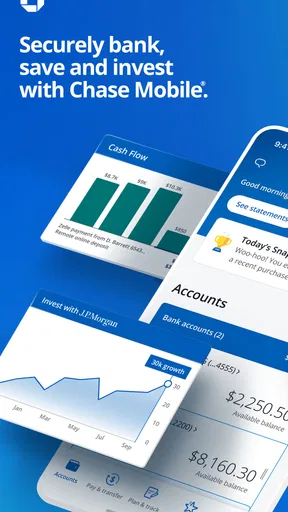
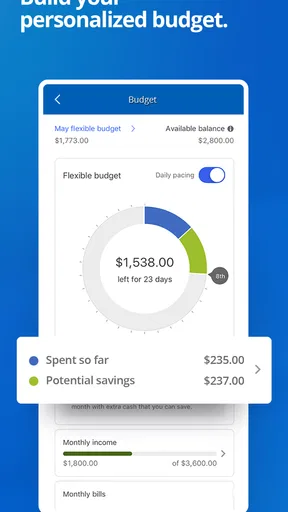
One of the coolest features is the ability to view all your accounts in one place. You can check balances, view recent transactions, and even track your spending habits. It’s like having a personal finance assistant right in your pocket. Plus, with the budgeting tools available, staying on top of your finances has never been easier.
Seamless Money Transfers
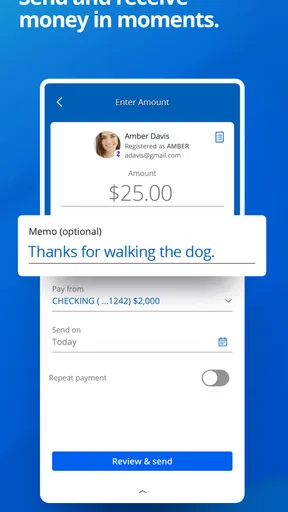
Need to send money to a friend or pay a bill? No problem! The app allows you to easily transfer money between Chase accounts or to other banks. You can also set up recurring payments if you’re someone who likes to set it and forget it.
Security Comes First
Security is a big deal these days, and Chase doesn’t skimp on that front. They’ve got multi-layer security protocols to ensure your data is safe. Plus, with fingerprint and facial recognition login options, you can access your account swiftly and securely.
Mobile Deposits
Remember those days when you had to run to the bank to deposit a check? Well, the app lets you deposit checks right from your phone. Just snap a photo of the check, and it’s in your account. It’s incredibly convenient, especially for those busy weekdays.
Using the App: A Personal Take
As someone who’s always on the move, the app has been a lifesaver. The user-friendly design means I can navigate through it without any hiccups. Whether I’m checking my balance while waiting for my morning coffee or transferring money to cover a last-minute expense, the app’s efficiency is impressive.
I particularly love the alerts feature. It keeps me updated with any unusual activity and reminds me of upcoming bills. It’s like having a little financial guardian angel watching over my shoulder.
Customer Support
If you ever run into issues, Chase’s customer support is just a tap away. The app allows you to quickly connect with a representative who can help resolve any problems. They’ve got a chat feature, which I find super convenient because who wants to be stuck on hold, right?
Everyday decisions and useful checks
One realistic use is handling a payment question while I am already out. If I am standing at a shop and cannot remember whether a bill has cleared, checking recent activity can help me avoid guessing at my available balance. I still use the transaction details rather than relying on memory or a rough total, because pending activity and completed activity are not always interchangeable in how I plan the rest of the day.
For a shared dinner or household cost, a transfer feature can spare a separate trip to a computer. I would confirm the recipient carefully, especially if I am selecting from a saved contact or repeating a previous transfer. Convenience is the strength here, but the same speed makes it sensible to slow down for the final review before sending.
Alerts are most useful when they are selective. I would choose notifications that help me act—such as activity I want to notice promptly or a reminder tied to a bill—rather than turning on every possible prompt and then tuning them out. A notification can draw attention to something worth checking, but I would open the transaction and verify its details before deciding whether it is actually unfamiliar.
What the version number can and cannot tell you
The app’s release in 2010 and its current version number give useful context: Chase Mobile is a mature banking product, not a brand-new experiment. Still, a version number by itself is not a change log. I would not infer from 4.712 alone that a particular feature has just been added or redesigned. Existing users are better served by checking the screens they rely on after an update and confirming that saved payment routines and notification preferences still match their needs.
That is especially relevant for people who depend on recurring payments. Before assuming a familiar setup is unchanged, I would review the payment schedule and account details in the app. This is not a reason to avoid updates; it is a practical habit for any tool that can move money. The useful question is not simply whether the app has changed, but whether the change affects the task I use it for.
Limits worth keeping in mind
Mobile banking trades the room and overview of a larger screen for speed and portability. That is a good exchange when I need a balance or a quick transaction check, but less attractive when I want to compare months of spending or work through a complicated financial decision. Even if spending tools are available, I would treat them as a helpful snapshot rather than assume they replace a dedicated budget process tailored to multiple accounts and goals.
Likewise, account access on a phone depends on having a working device and connection when I need it. I would not make the app my only way to remember important payment dates or account details. Keeping a separate record of essential obligations can be useful if a phone is unavailable, and it prevents a convenient tool from becoming a single point of failure in my routine.
Security features such as fingerprint or facial recognition can make signing in easier, but they do not remove the need to protect the device itself. I would use a screen lock, avoid handling sensitive banking tasks on a device I do not control, and sign out or secure the phone if it is shared. Those are ordinary precautions, not a claim that any one login method makes every situation risk-free.
Choosing it for the right job
Compared with a branch visit, the app is better for routine checks and straightforward tasks that do not need an in-person conversation. Compared with a general budgeting service, it is more directly tied to Chase banking and transactions, while a separate tool may offer a broader picture if your finances are spread across institutions. Neither alternative wins in every situation: I would use mobile banking for access and execution, and choose a broader planning tool or a person-to-person conversation when that better matches the question.
For someone who is new to mobile banking, I would start with low-stakes actions: sign in, learn where account activity appears, and inspect how alerts are presented before relying on a more consequential payment workflow. If you already know Chase’s online banking, the phone app is likely most useful as a portable companion for moments when a desktop is inconvenient, rather than as a reason to rebuild your entire money routine.
Wrapping It Up
All in all, the app is a game-changer for anyone looking to manage their finances effortlessly. With its array of features designed to make banking easy, it’s no surprise that it’s a favorite among many. From secure transactions to on-the-go deposits, this app has you covered.
If you haven’t tried it yet, I’d definitely recommend downloading it and giving it a spin. It might just become your new favorite financial tool. And hey, if you’re already using it, feel free to share your experiences. I’d love to hear what you think!
My final test before relying on it
Before I make a mobile banking app part of an important routine, I check that I can sign in comfortably, find the account I need, and understand the confirmation shown after an action. I would also check that the device meets the app’s minimum operating system requirement of 11. That simple setup check answers a practical question before I am away from home and need access in a hurry.
My recommendation is straightforward: if you bank with Chase and want a convenient way to handle everyday account tasks, this is a sensible app to try. If you want deep, cross-bank financial planning or prefer to keep banking off your phone, choose a tool or method designed around that preference instead. I like it best as a useful companion to a thoughtful banking routine, not as a replacement for reviewing what I spend and where my money goes.
Privacy and Permissions
See what permissions an app requests and how it handles your data.
- Contacts
- read your contacts
- Location
- approximate location (network-based), precise location (GPS and network-based)
- Phone
- directly call phone numbers
- Photos/Media/Files
- read the contents of your USB storage
- Storage
- read the contents of your USB storage
- Camera
- take pictures and videos
- Microphone
- record audio
- Wi-Fi connection information
- view Wi-Fi connections
- Other
- view network connections, pair with Bluetooth devices, access Bluetooth settings, change network connectivity, full network access, change your audio settings, control Near Field Communication, run at startup, reorder running apps, control vibration, prevent device from sleeping
Verdict
Strengths of Chase Mobile
- User-friendly interface for easy navigation.
- Quick access to account balances and transactions.
- Secure login with fingerprint or facial recognition.
- Customizable alerts for account activity.
- Integrated budgeting and spending tools.
Limitations of Chase Mobile
- Occasional bugs during app updates.
- Limited features for non-Chase customers.
- Some users report delayed transaction updates.
- Requires strong internet connection for optimal use.
- Limited support for international transactions.
Similar Picks in This Category
View All
Google Wallet
Google LLC4.3

Airtel: Recharge, Bank & Loans
Airtel4.0

PayPal - Pay, Send, Save
PayPal Mobile4.2

DANA Indonesia Digital Wallet
PT Espay Debit Indonesia Koe4.5

Binance: Buy Bitcoin & Crypto
Binance Inc.4.8

Cash App
Block, Inc.4.7
Frequently Asked Questions
What features does Chase Mobile offer?
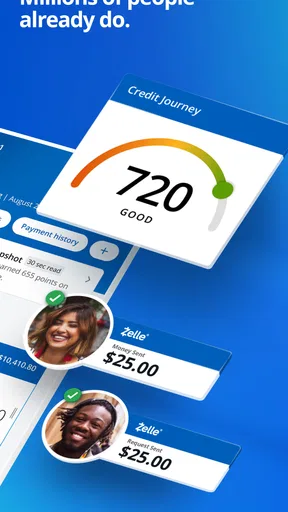
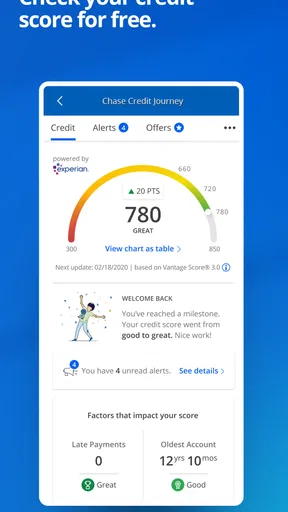
Chase Mobile provides a comprehensive suite of features including account management, mobile check deposit, bill payments, and funds transfers. Users can also access credit scores, set up account alerts, and locate nearby ATMs and branches. The app aims to deliver a full banking experience directly from your smartphone for convenience and efficiency.
Is Chase Mobile secure to use?
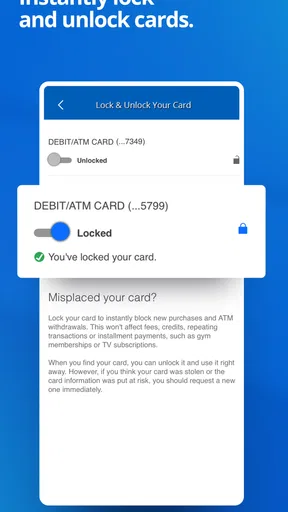
Yes, Chase Mobile implements multiple layers of security to protect user information. This includes encryption, biometric login options like fingerprint and face recognition, and secure access codes. Additionally, the app allows users to instantly lock their card in case of loss or theft, adding an extra layer of security.
Can I deposit checks using Chase Mobile?
Absolutely. Chase Mobile features a mobile check deposit function that allows users to deposit checks by simply taking a photo of the check with their smartphone. This feature is convenient, saving time from visiting a branch, and is designed with user-friendly instructions to guide you through the process.
Are there any fees associated with using Chase Mobile?
Using Chase Mobile itself is free, but standard banking fees may apply depending on the services you use. For instance, fees might be incurred for overdrafts or wire transfers. It’s advisable to review your account’s terms and conditions or consult with a Chase representative for specific fee-related queries.
How can I troubleshoot issues with Chase Mobile?
If you experience issues with Chase Mobile, start by ensuring your app is up to date and your device meets the app's system requirements. For persistent problems, you can check the app’s FAQ section, contact Chase customer support directly through the app, or visit their website for further assistance.
